
1) AI Agent Column
The first column is an experienced advanced AI agent. It can explain architecture, debug errors, teach concepts, and help students turn vague ideas into structured implementation plans.
CodeBuilder is a core learning workspace of the College of Artificial Intelligence and Applied Sciences. Students do not just watch tutorials. They collaborate with an expert AI agent, write real code, and instantly see live output as they build games, web apps, and hands-on practice projects that strengthen real technical capability.
Every project inside CodeBuilder revolves around three synchronized windows that make learning and execution happen at the same time.
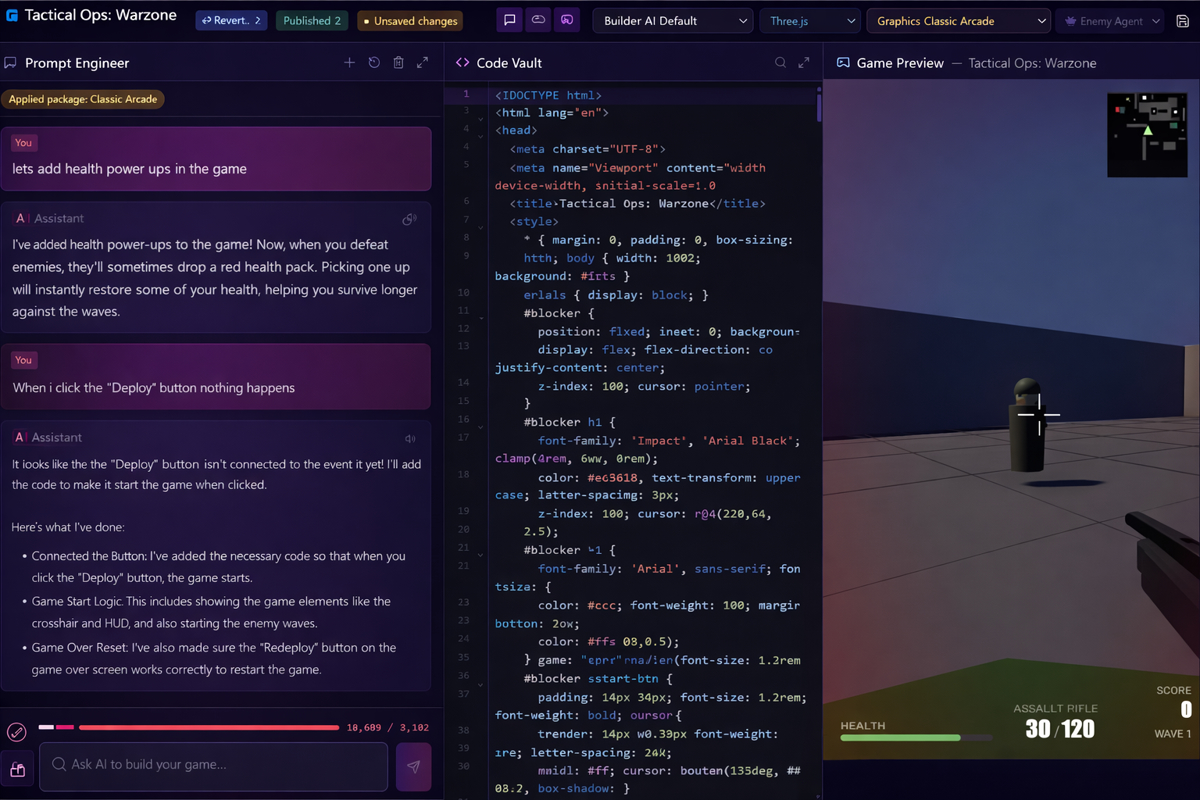
The first column is an experienced advanced AI agent. It can explain architecture, debug errors, teach concepts, and help students turn vague ideas into structured implementation plans.
The middle column is where students write and refine code. As they edit, the project evolves in real time. It is a true developer workflow with practical iteration, not a toy simulator.
The right column is the rendered output panel. Students immediately see what their code produces, from UI updates to game logic behavior, making cause and effect crystal clear.
This is not just another coding toy. CodeBuilder combines expert-level AI guidance, production-style coding workflows, and immediate rendering feedback to help students build real-world solutions while learning at speed. It is designed to develop practical engineering skill, confidence, and portfolio-ready output from day one.